
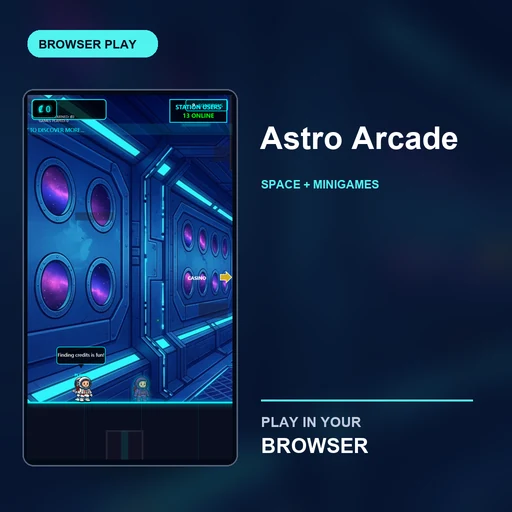
Astro Arcade
Explore a space-station arcade as a small astronaut. Find minigame entrances, collect virtual credits, and browse suit and spacecraft shops in Astro Arcade.
About Astro Arcade
Explore the Astro Arcade station
Astro Arcade connects a collection of activities through a space-station hub. Walk around as an astronaut, approach signs and entrances, and choose what to try next. Shops and minigame stations turn the hub into a place to explore between short arcade sessions.
Find an activity along the station
The station includes Whack-an-Alien, Meteor Dodge, Cosmic Catch, Grav-Obby, Hex-Fall, Moon Jump, and Starship Run entrances. Each activity has its own objective and controls. Move toward a location and interact when prompted to discover how that activity works.
Spend the credits you earn
Virtual credits connect your activity sessions with suit and spacecraft shops. Check what each shop offers, then return to the activities when you want to earn more. The station also contains casino-style activities that use the same kind of virtual game currency, with no cash value.
Use the station guide when you need direction
The station guide introduces movement, jumping, and interaction. Desktop controls use WASD or arrows with E or Enter for nearby prompts, while touch controls provide a joystick and action buttons. The astronaut visitors and activity opponents belong to this single-player game world.
How to Play Astro Arcade
- Move through the station with WASD or the arrow keys. Jump with Space or W.
- Approach a station, shop, or minigame entrance and use E or Enter when an interaction prompt appears.
- Try activities such as Whack-an-Alien, Meteor Dodge, Cosmic Catch, and the platform challenges. Follow each activity’s on-screen controls.
- Earn virtual credits through play, then visit the suit or spacecraft shop to inspect available purchases.
- Use the station guide for help finding activities and understanding the hub.
- On touch screens, use the movement joystick, jump button, and Enter action.
Casino-style activities use virtual game credits with no cash value.
Astro Arcade FAQ
What can I do in Astro Arcade?
Explore a space-station hub, enter arcade activities, earn virtual credits, and browse suit and spacecraft shops. The station links several different minigames in one browser game.
How do I enter a minigame or shop?
Move close to its entrance and watch for an interaction prompt. Press E or Enter, or use the on-screen Enter action, when the prompt is available.
What activities are available?
Station entrances include Whack-an-Alien, Meteor Dodge, Cosmic Catch, Grav-Obby, Hex-Fall, Moon Jump, and Starship Run. Use the controls displayed inside each activity.
How do I move and jump?
Use WASD or the arrow keys to move and Space or W to jump. Touch players can use the movement joystick and jump button. E or Enter interacts with nearby locations.
Are the other station visitors real players?
This hosted build is a single-player game with game-controlled visitors and activities. Its station population display does not establish a live shared multiplayer world.
Can I win real money?
No. The shops and casino-style activities use virtual game credits with no cash value. They are part of the game’s progression and entertainment.
Can I continue on another device?
The current version uses browser-local saved data. Progress is not automatically synchronized to an account or transferred between browsers and devices.